conversion pixel
Learn what an eSIM is, how it works, and why it’s replacing physical SIM cards. See eSIM benefits, compatibility tips, and how to get started fast.

What Is an eSIM and why do more phones use it now?

An eSIM is a digital SIM built into your phone. Instead of inserting a plastic SIM card, you download a cellular plan to your device and connect to the network.

Think of it like this:

  • Physical SIM: a removable chip you insert
  • eSIM: a digital profile you install (no shipping, no tiny card)

How an eSIM works
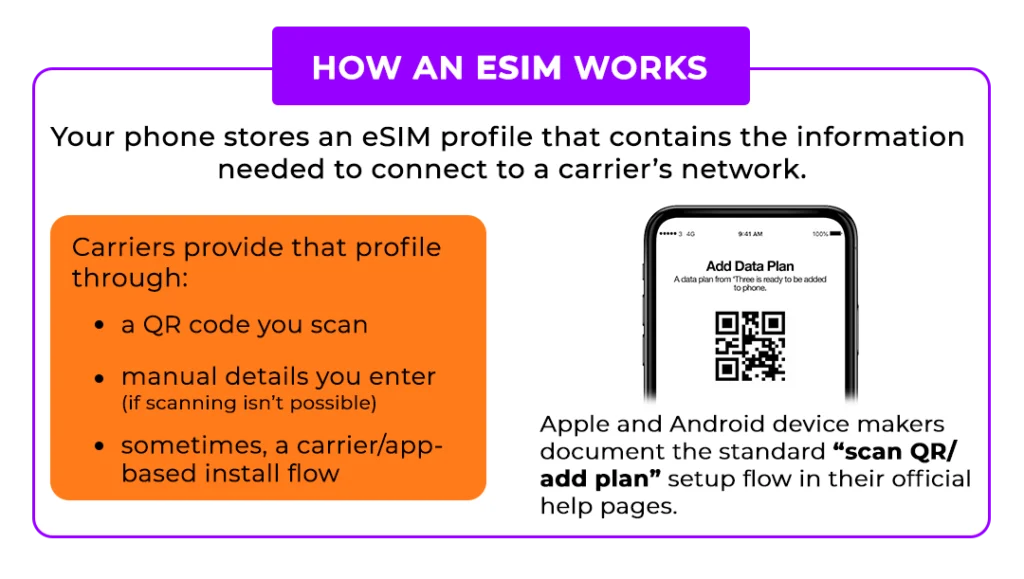
Your phone stores an eSIM profile that contains the information needed to connect to a carrier’s network.

Carriers provide that profile through:

Apple and Android device makers document the standard “scan QR / add plan” setup flow in their official help pages.

Why People Choose eSIM Plans

Top benefits shoppers care about:

  • Instant setup (no waiting for shipping)
  • Great for dual lines (work + personal, or backup line)
  • Less hassle (no SIM swapping, no lost cards)
  • Easier plan changes when switching carriers (in many cases)

eSIM vs Physical SIM: which is better?

Choose eSIM if you want:

Choose a physical SIM if you:

  • Swap phones constantly
  • Want a removable backup

SpeedTalk also explains these tradeoffs and positions eSIM as the “instant activation” option.

What You Need Before You Buy an eSIM Plan

  1. An eSIM-compatible phone (click here to check our compatibility list)
  2. Device must be unlocked
  3. Reliable Wi-Fi during install (for downloading the eSIM profile)

Common eSIM Myths

  • “eSIM means no phone number.” False. Your eSIM can have a full phone number.
  • “eSIM is only for travel.” False. Many people use eSIM daily for prepaid plans, backups, and dual lines.
  • “If I delete my eSIM I’m fine.” Sometimes. Deleting can remove the plan profile, and you may need a replacement from the carrier.
SpeedTalk Mobile eSIM Frequently Asked Questions

An eSIM (embedded SIM) is a built-in digital SIM card inside your phone that allows you to activate a cellular plan without inserting a physical SIM card. Instead of swapping plastic SIM cards, you download an eSIM profile directly to your device.

Many newer smartphones support prepaid and no-contract eSIM plans, making activation faster and more flexible.

An eSIM works by downloading a secure digital SIM profile to your device’s embedded chip (eUICC). Once installed, the eSIM connects to your carrier’s network for calls, text, and data, just like a physical SIM card. Instant activation eSIM plans automatically push the activation profile to your phone.

The main difference is that an eSIM is built into your phone, while a physical SIM is removable.

  • eSIM: Digital, no shipping required, faster setup
  • Physical SIM: Removable card that can be moved between phones

For users seeking instant activation and convenience, eSIM offers a simplified setup process.

To use an eSIM, your device must be compatible with eSIM technology. Most newer iPhones and Android devices, including Apple iOS, Pixel, and Samsung Galaxy models, support eSIM. Your phone must also be unlocked to activate a prepaid eSIM plan.

Yes. Your phone must be unlocked to activate an eSIM plan. Locked devices may block activation.
  • Ensure Wi-Fi is enabled throughout the entire process.
  • Once activation is complete, you will receive a confirmation email and a pop-up notification on your device to add the eSIM.
  • A banner will appear stating, “Your eSIM is ready to be installed.”
  • Tap the “Add eSIM” option.
  • Follow any additional on-screen prompts.
  • Ensure Wi-Fi is enabled throughout the entire process.
  • Once activation is complete, you will receive a confirmation email and a pop-up notification on your device to add the eSIM.
  • A banner will appear stating, “Your eSIM is ready to be installed.”
  • Tap the “Add eSIM” option.
  • Follow any additional on-screen prompts.

QR code activation allows you to scan a code provided by your carrier. The QR code contains the activation credentials required to securely download your eSIM profile.

Most instant activation eSIM plans are completed within minutes. Activation time depends on device compatibility and network connection.

Yes. Many devices allow you to transfer an eSIM to a new phone, especially between newer iPhone models. In some cases, you may need a new activation code.

If you delete your eSIM, the cellular profile is removed from your device. To restore service, you may need to request a new activation code and complete the activation process again.

Once an eSIM profile is deleted from your device, it cannot be reinstalled. A new eSIM is required. In this case, contact Customer Service for assistance.

Common reasons include:

  • The phone is locked
  • Weak Wi-Fi connection
  • Incorrect activation code
  • Outdated software

If activation fails, restart your device and retry the activation process.

  • Ensure the eSIM line is turned on
  • Confirm it is selected for cellular data
  • Check APN settings (if required)
  • Restart your phone

Most prepaid eSIM plans work automatically without manual network settings.

Yes. Many users choose to use an eSIM as a backup line for emergencies, travel, or business purposes. Dual SIM functionality makes this possible.

Yes. With instant activation eSIM plans, you can purchase and activate service within minutes.

In most cases, yes. Number porting is typically supported when switching to a prepaid eSIM plan, although processing times may vary.

An eSIM cannot be physically removed, which reduces the risk of theft or SIM swapping. Digital SIM profiles are securely downloaded and encrypted during installation.

eSIM profiles are protected by secure carrier provisioning systems and encryption. Unlike removable SIM cards, they cannot be physically duplicated.

No. Call quality and data speed depend on the network and plan, not whether you use an eSIM or a physical SIM.

low cost esim prepaid wireless no contract speedtalk mobile

OR

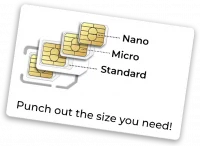
Prepaid triple cut SIM card standard micro nano sizes for unlocked phones budget wireless plans no contract required

During activation you can switch to an eSIM or use our Physical SIM on your Apple iPhone, Samsung phone or Google phone.

eSIM Compatibility List

  • iPhone XR
  • iPhone XS
  • iPhone XS Max
  • iPhone 11
  • iPhone 11 Pro
  • iPhone 11 Pro Max
  • iPhone SE (2020)
  • iPhone SE (2022)
  • iPhone 12
  • iPhone 12 Mini
  • iPhone 12 Pro
  • iPhone 12 Pro Max
  • iPhone 13
  • iPhone 13 Mini
  • iPhone 13 Pro
  • iPhone 13 Pro Max
  • iPhone SE 3 (2022)
  • iPhone 14
  • iPhone 14 Plus
  • iPhone 14 Pro
  • iPhone 14 Pro Max
  • iPhone 15
  • iPhone 15 Plus
  • iPhone 15 Pro
  • iPhone 15 Pro Max
  • iPhone 16
  • iPhone 16 Plus
  • iPhone 16e
  • iPhone 16 Pro
  • iPhone 16 Pro Max
  • iPhone 17
  • iPhone 17 Pro
  • iPhone 17 Pro Max
  • iPhone Air
  • Galaxy S20
  • Galaxy S20+
  • Galaxy S20+ 5G
  • Galaxy S20 Ultra
  • Galaxy S20 Ultra 5G
  • Galaxy S21
  • Galaxy S21+ 5G
  • Galaxy S21 Ultra 5G
  • Galaxy S22
  • Galaxy S22+
  • Galaxy S22 Ultra
  • Galaxy S23
  • Galaxy S23+
  • Galaxy S23 Ultra
  • Galaxy S23 FE
  • Galaxy S24
  • Galaxy S24+
  • Galaxy S24 Ultra
  • Galaxy S25
  • Galaxy S25+
  • Galaxy S25 Ultra
  • Galaxy Z Fold
  • Galaxy Z Fold 2
  • Galaxy Z Fold 3
  • Galaxy Z Fold 4
  • Galaxy Z Fold 5
  • Galaxy Z Fold 6
  • Galaxy Z Fold 7
  • Galaxy Z Flip
  • Galaxy Z Flip 3
  • Galaxy Z Flip 4
  • Galaxy Z Flip 5
  • Galaxy Z Flip 6
  • Galaxy Z Flip 7
  • Galaxy Note 20
  • Galaxy Note 20 Ultra 5G
  • Pixel 2
  • Pixel 2 XL
  • Pixel 3
  • Pixel 3 XL
  • Pixel 3a
  • Pixel 3a XL
  • Pixel 4
  • Pixel 4a
  • Pixel 4 XL
  • Pixel 5
  • Pixel 5a
  • Pixel 6
  • Pixel 6a
  • Pixel 6 Pro
  • Pixel 7
  • Pixel 7a
  • Pixel 7 Pro
  • Pixel 8
  • Pixel 8 Pro
  • Pixel 9
  • Pixel 9a
  • Pixel 9 Pro
  • Pixel 9 Pro XL
  • Pixel 9 Pro Fold

Smartphone & Cellphone Plans

Smartwatch & Wearable Plans

IOT & Broadband Plans

GPS Tracker Plans Worldwide

On Key

Related Posts

The Best Unlimited Phone Plans 3

3-In-1 SIM Cards

3-In-1 SIM Card. The Best Unlimited Phone Plans. Find the best unlimited data plan for your smartphone right now with SpeedTalk Mobile.

Your cart is currently empty.

Return to shop

eSIM available for Apple iPhone, Samsung Phone and Google Phone
Device Compatibility List
Apple iPhone
  • iPhone XR
  • iPhone XS
  • iPhone XS Max
  • iPhone 11
  • iPhone 11 Pro
  • iPhone 11 Pro Max
  • iPhone SE (2020)
  • iPhone SE (2022)
  • iPhone 12
  • iPhone 12 Mini
  • iPhone 12 Pro
  • iPhone 12 Pro Max
  • iPhone 13
  • iPhone 13 Mini
  • iPhone 13 Pro
  • iPhone 13 Pro Max
  • iPhone SE 3 (2022)
  • iPhone 14
  • iPhone 14 Plus
  • iPhone 14 Pro
  • iPhone 14 Pro Max
  • iPhone 15
  • iPhone 15 Plus
  • iPhone 15 Pro
  • iPhone 15 Pro Max
  • iPhone 16
  • iPhone 16 Plus
  • iPhone 16e
  • iPhone 16 Pro
  • iPhone 16 Pro Max
  • iPhone 17
  • iPhone 17 Pro
  • iPhone 17 Pro Max
  • iPhone Air
  • Galaxy S20
  • Galaxy S20+
  • Galaxy S20+ 5G
  • Galaxy S20 Ultra
  • Galaxy S20 Ultra 5G
  • Galaxy S21
  • Galaxy S21+ 5G
  • Galaxy S21 Ultra 5G
  • Galaxy S22
  • Galaxy S22+
  • Galaxy S22 Ultra
  • Galaxy S23
  • Galaxy S23+
  • Galaxy S23 Ultra
  • Galaxy S23 FE
  • Galaxy S24
  • Galaxy S24+
  • Galaxy S24 Ultra
  • Galaxy S25
  • Galaxy S25+
  • Galaxy S25 Ultra
  • Galaxy Z Fold
  • Galaxy Z Fold 2
  • Galaxy Z Fold 3
  • Galaxy Z Fold 4
  • Galaxy Z Fold 5
  • Galaxy Z Fold 6
  • Galaxy Z Fold 7
  • Galaxy Z Flip
  • Galaxy Z Flip 3
  • Galaxy Z Flip 4
  • Galaxy Z Flip 5
  • Galaxy Z Flip 6
  • Galaxy Z Flip 7
  • Galaxy Note 20
  • Galaxy Note 20 Ultra 5G
  • Pixel 2
  • Pixel 2 XL
  • Pixel 3
  • Pixel 3 XL
  • Pixel 3a
  • Pixel 3a XL
  • Pixel 4
  • Pixel 4a
  • Pixel 4 XL
  • Pixel 5
  • Pixel 5a
  • Pixel 6
  • Pixel 6a
  • Pixel 6 Pro
  • Pixel 7
  • Pixel 7a
  • Pixel 7 Pro
  • Pixel 8
  • Pixel 8 Pro
  • Pixel 9
  • Pixel 9a
  • Pixel 9 Pro
  • Pixel 9 Pro XL
  • Pixel 9 Pro Fold

Refunds And Returns

Cancellations / Refunds

We want you to be delighted with your purchase of this subscription and prepaid service. If you are not satisfied with your service and it is within 14 days of receiving your starter kit, we will refund your purchase in full.
However, if you do not contact us within this 14 day period, or if you have consumed more than 30 minutes, 30 texts, or 30MB of data within the said period, you will no longer be eligible for a refund.
If you transfer/port out your number to another carrier, you must have an active account with SpeedTalk Mobile. In addition in order to maintain our porting system, $19 service fee is required if you port out your number before 90-days from first activating the service. Your Service will be deactivated with us once the NSP (New Service Provider) successfully ports your number.“

Returns

We will gladly accept the return of products that are defective due to defects in manufacturing and/or workmanship for 30 days from the date of purchase. Fulfillment mistakes that we make resulting in the shipment of incorrect product to you will also be accepted for return 30 days from the date of purchase.

Miscellaneous

Please visit this page periodically to see the most current Terms and Conditions as we may change the term of use without advance notice.
SpeedTalk Mobile Wireless Customer Support: 1-866-701-5577

There is no contract, cancellations can be made any time by contacting customer support. A valid credit card is required to cover overages in case you exceed the applicable Voice, SMS and Data limits. To avoid overage charges, you should purchase the appropriate plan for your anticipated needs. 

Skip to content